

Accessible content is any digital or educational material designed to be usable by everyone, regardless of disability, learning style, or device. Understanding how accessible content improves outcomes matters because the evidence is direct: accessible content boosts engagement by up to 40%, and 76% of higher education faculty report it improves student learning outcomes. Frameworks like Universal Design for Learning (UDL) and standards like WCAG give educators a clear path to build materials that work for every reader, including those with dyslexia, ADHD, visual impairments, or language barriers. The industry term for this practice is "inclusive design," and it produces measurable gains far beyond legal compliance.
How accessible content improves outcomes: the evidence
Accessible content delivers measurable gains across engagement, comprehension, and revenue. The numbers are not marginal. Disability-inclusive companies report 1.6x higher revenue than peers who ignore accessibility. That gap reflects a direct connection between inclusive design and business performance.
The classroom data is equally strong. When educators apply accessible design principles, student performance improves across the board. Video captions alone account for a significant share of the 40% engagement lift seen in accessible content environments. Captions help not just deaf students but also learners in noisy environments, non-native English speakers, and anyone reviewing material at low volume.

Open standards also cut production costs. Open accessibility standards reduce content production time from months to days. That efficiency gain frees educators to focus on content quality rather than format remediation. Accessible design, when built in from the start, is faster and cheaper than fixing inaccessible content after the fact.
The commercial case is just as clear. Accessible websites see conversion rates increase by 18% compared to inaccessible counterparts. For educational platforms, that translates to higher enrollment, better retention, and stronger learner satisfaction scores.
Pro Tip: Track help desk tickets and user error rates alongside engagement metrics. A drop in support volume is one of the clearest signals that your accessibility improvements are working.
Which frameworks guide effective accessible content creation?
Two frameworks define best practice in accessible content design: WCAG and Universal Design for Learning. They work at different levels but point toward the same goal.
WCAG and the POUR principles
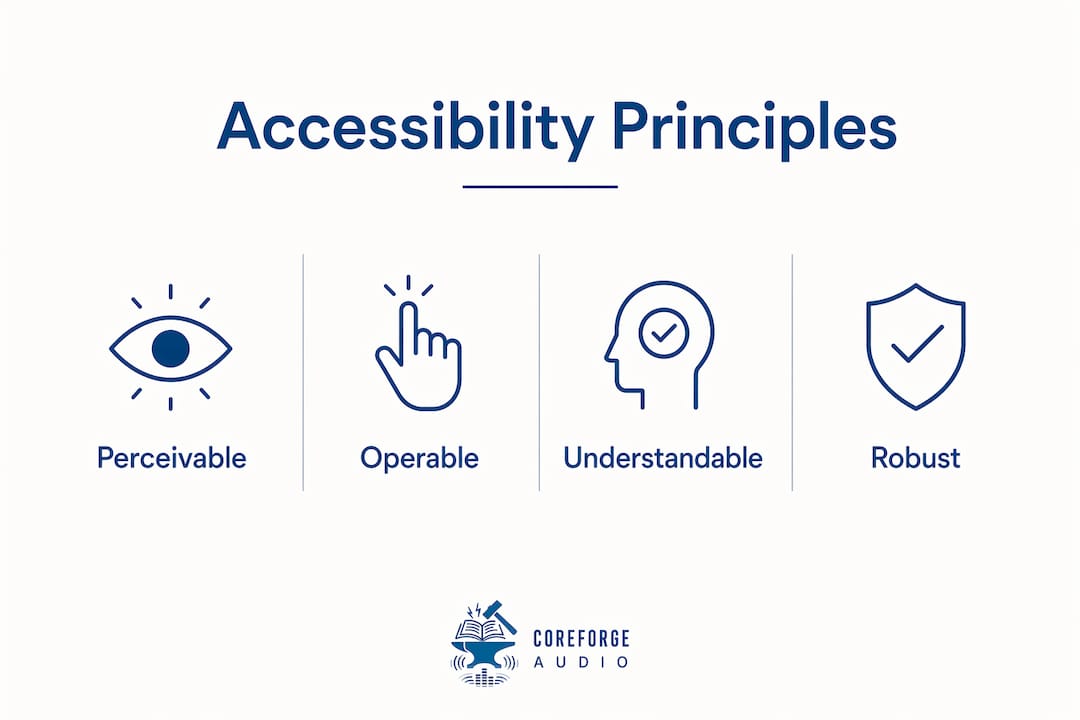
WCAG, the Web Content Accessibility Guidelines, organizes accessibility around four principles known as POUR: Perceivable, Operable, Understandable, and Robust. Perceivable means all content can be seen or heard in some form, including through screen readers or captions. Operable means all functions work via keyboard, not just a mouse. Understandable means language and navigation are clear and predictable. Robust means content works across assistive technologies and browsers. Section 508, the U.S. federal standard, maps directly onto WCAG compliance requirements for government and educational institutions.
Universal Design for Learning
UDL provides a proactive framework to design materials accessible to all learners by offering multiple means of representation, engagement, and expression. Representation means presenting information in more than one format, such as audio alongside text. Engagement means giving learners choices in how they interact with content. Expression means allowing multiple ways to demonstrate understanding, not just written tests. UDL reduces the need for individual accommodations by anticipating diverse needs at the design stage rather than patching them afterward.
| Framework | Focus | Primary benefit |
|---|---|---|
| WCAG / POUR | Technical web standards | Ensures content works across devices and assistive tools |
| Universal Design for Learning | Instructional design | Reduces barriers for all learners from the start |
| Section 508 | U.S. federal compliance | Legal standard for government and education platforms |
Pro Tip: Apply UDL principles before you build, not after. Retrofitting accessibility is costly and error-prone. Designing for inclusion from day one saves time and produces better results.
Does accessible content benefit learners without disabilities?
Accessible content benefits every learner, not just those with documented disabilities. The concept that explains this is the Curb Cut Effect. A curb cut is the ramp built into a sidewalk for wheelchair users. It also helps parents with strollers, delivery workers with carts, and cyclists. The Curb Cut Effect in digital accessibility works the same way: features built for one group improve the experience for everyone.
Accessible digital environments reduce friction for multilingual learners, mobile users, and busy adult students. A student reading on a phone during a commute benefits from the same clear navigation and adjustable text that a visually impaired reader needs. A non-native English speaker benefits from the same plain language that helps a learner with a cognitive disability.
Accessibility is best framed as an audience strategy with measurable impacts on SEO, user retention, and task completion, not as a compliance checkbox. When you design for the edges of your audience, you improve the experience for the center.
Semantic HTML and clear navigation also improve search engine discoverability. Screen readers and search engine crawlers both rely on well-structured content. Accessible design is, in practice, good SEO. Educators and content creators who build accessibly reach more learners through organic search, not just through direct links.
The benefits extend to why accessible reading materials matter across every audience segment, from students with learning differences to adults returning to education later in life.
What practical strategies embed accessibility from the start?
Embedding accessibility at the design phase produces better outcomes than retrofitting it later. The following steps give educators and content creators a clear path forward.
-
Start with an accessibility audit. Before creating new content, assess what you already have. Identify missing captions, low-contrast text, and navigation gaps. Free tools like WAVE and the axe browser extension flag WCAG violations quickly.
-
Write in plain language. Short sentences, active verbs, and common words reduce cognitive load for all learners. Aim for a reading level that matches your audience, not one that impresses colleagues.
-
Add captions and transcripts to all audio and video. Captions are the single highest-impact accessibility feature for engagement. They serve deaf learners, non-native speakers, and anyone in a sound-sensitive environment.
-
Use structured headings and semantic HTML. Heading levels (H1, H2, H3) create a navigable outline for screen reader users and improve comprehension for all readers. Never use bold text as a substitute for a proper heading tag.
-
Offer content in multiple formats. Provide text, audio, and visual versions of key material where possible. Audio supplementation in curriculum gives learners with dyslexia, ADHD, or visual impairments a path to the same content without requiring separate accommodations.
-
Test with real users. Automated tools catch roughly 30% of accessibility issues. Manual testing with screen readers and actual learners with disabilities catches the rest.
AI-powered tools combined with UDL frameworks significantly predict better student engagement and academic success in inclusive settings. AI can generate captions, suggest plain-language rewrites, and flag structural issues at scale. That makes accessibility workflows faster without reducing quality.
Institutional leadership must embed accessibility as a core expectation, not an afterthought. Without buy-in from administrators and curriculum directors, accessibility remains a one-person effort that never scales. The most effective programs assign clear ownership, set measurable targets, and review content against WCAG standards on a regular schedule.
Key Takeaways
Accessible content improves learning outcomes, engagement, and reach by removing barriers for all learners, not just those with disabilities.
| Point | Details |
|---|---|
| Engagement lifts are measurable | Accessible content boosts engagement by up to 40%, with captions driving a large share of that gain. |
| UDL reduces accommodation burden | Designing with Universal Design for Learning principles cuts the need for individual fixes after content is published. |
| Curb Cut Effect broadens impact | Accessibility features built for disabled learners improve usability for mobile users, multilingual readers, and adult students too. |
| Design phase beats retrofitting | Embedding accessibility from the start is faster, cheaper, and more effective than fixing inaccessible content later. |
| AI accelerates accessible workflows | Combining AI tools with UDL frameworks predicts stronger student engagement and academic success in inclusive settings. |
Accessibility as strategy, not obligation
I've watched institutions spend years treating accessibility as a legal risk to manage rather than a design principle to build around. The result is always the same: rushed retrofits, frustrated learners, and content that technically passes an audit but fails in practice.
The shift that actually moves outcomes is treating accessibility as an audience strategy. When you ask "who are we leaving out?" before you publish, you catch problems that no automated tool will flag. You write clearer sentences. You add audio options. You structure navigation so a learner using a screen reader and a learner skimming on a phone both find what they need in under 30 seconds.
The hardest part is not the technology. AI captioning, dyslexia-friendly fonts, and adjustable playback speeds are all available and affordable. The hard part is getting leadership to treat accessibility as a first-class requirement, not a post-launch task. I've seen a single administrator's commitment to UDL transform a department's entire content workflow in one semester. I've also seen well-funded teams produce inaccessible content for years because no one owned the standard.
The future belongs to platforms that build inclusion into their architecture from day one. That is not idealism. It is the direction the evidence points.
— Sarmed
Coreforgeaudio and accessible audio learning
Accessible audio is one of the most direct ways to close the gap between content and comprehension for learners with reading barriers.
Coreforgeaudio is built around that principle. The platform provides human-narrated audiobooks with dyslexia-friendly fonts, adjustable narration speeds, and multilingual support, designed from the ground up for learners with dyslexia, ADHD, visual impairments, and busy schedules. For educators looking to put the research in this article into practice, Coreforgeaudio offers a concrete starting point. You can learn more about audio learning for educators or visit Coreforgeaudio to see how accessible audio fits into your curriculum.
FAQ
What is accessible content?
Accessible content is any digital or educational material designed to be usable by people with disabilities, diverse learning needs, or varying devices. It follows standards like WCAG and principles like Universal Design for Learning.
How does accessible content improve learning outcomes?
Accessible content removes barriers to comprehension and engagement. Research shows 76% of higher education faculty agree it improves student learning outcomes, and engagement lifts of up to 40% are documented in accessible content environments.
What is the Curb Cut Effect in education?
The Curb Cut Effect means that accessibility features designed for learners with disabilities also improve the experience for all learners, including mobile users, multilingual students, and adults with temporary impairments.
What is Universal Design for Learning?
Universal Design for Learning is a proactive instructional framework that offers multiple means of representation, engagement, and expression. It reduces the need for individual accommodations by designing inclusively from the start.
Does accessibility improve SEO?
Accessible content uses semantic HTML and clear navigation structures that search engines and screen readers both rely on. Better structure improves discoverability and organic reach alongside learner experience.