

Visually impaired individuals access digital content through assistive technologies that translate visual information into audio, tactile, or magnified formats, making the web fully navigable without sight. The industry term for this field is "digital accessibility," and it covers everything from screen readers like JAWS, NVDA, and VoiceOver to refreshable braille displays and screen magnification software. Standards like WCAG 2.2 define the technical requirements that make this possible. Understanding how these tools work, and what digital content must provide to support them, puts you in control of your own reading experience.
How visually impaired users access digital content with screen readers
Screen readers are the most widely used assistive technology for sight loss, and they work by interpreting a webpage's semantic code rather than its visual appearance. The software reads the Document Object Model (DOM), the underlying structure of a webpage, and converts that information into synthesized speech or sends it to a refreshable braille display. This means a beautifully designed page with no semantic structure is completely silent to a screen reader. The visual experience is irrelevant. The code is everything.
Three screen readers dominate the market. JAWS (Job Access With Speech) is the most established Windows-based option, widely used in professional and educational settings. NVDA (NonVisual Desktop Access) is a free, open-source alternative for Windows with strong community support. VoiceOver is built directly into Apple devices, including iPhone, iPad, and Mac, requiring no additional installation. Each interprets semantic HTML and ARIA attributes to provide navigable, contextual content, but they differ in keyboard shortcuts, verbosity settings, and compatibility with specific applications.
What makes content compatible with these tools comes down to a short list of technical requirements:
- Semantic HTML headings (H1 through H6) that create a logical document outline
- Alt text on every image, describing the content and function of the visual
- ARIA landmark roles that label page regions like navigation, main, and footer
- Descriptive link text that makes sense out of context (not "click here")
- Form labels explicitly associated with their input fields
Common accessibility barriers include missing alt text, poor heading structure, lack of captions, and broken keyboard navigation. Each of these stops a screen reader user mid-task in a way that has no equivalent for sighted users.
Pro Tip: When testing a website's screen reader compatibility, try navigating it using only your keyboard. If you get stuck or lose focus at any point, a screen reader user will too.
A critical data point: 71.3% of screen reader users rely exclusively on audio output rather than braille. This means audio quality, reading order, and speech clarity are not secondary concerns. They are the primary interface.
What other assistive technologies support digital access for blind users
Screen readers are not the only tool in the toolkit. Depending on the degree of vision loss and the type of content, several other technologies provide critical support for enhancing digital access for blind people and those with low vision.
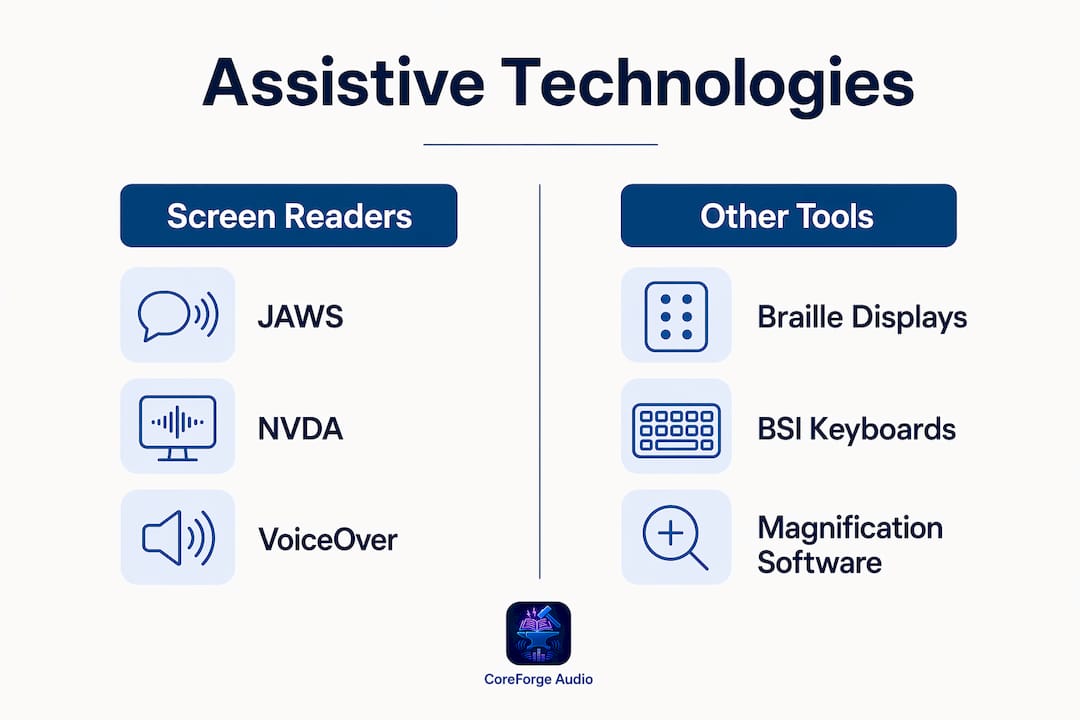
Refreshable braille displays connect to computers and smartphones via USB or Bluetooth, converting on-screen text into tactile braille in real time. They are particularly valuable for users who are both deaf and blind, and for reading technical content like code or mathematical notation where audio output can be ambiguous.

Braille Screen Input (BSI) on smartphones takes this further. BSI converts a touchscreen into a braille keyboard using gesture-based navigation, with two distinct modes. In tabletop mode, the device lies flat and the user types with fingers pointing down. In screen-away mode, the device faces away from the user. Each mode requires learning a specific gesture set, but once mastered, BSI allows fast, silent text input without a physical keyboard.
Screen magnification software serves users with low vision rather than total blindness. Tools like ZoomText and the built-in magnification features in Windows and macOS can enlarge content up to 20 times its original size, reflow text, and enhance color contrast. These tools work independently of screen readers but can also run alongside them.
Here is a direct comparison of the primary assistive technology categories:
| Technology | Best for | Key limitation |
|---|---|---|
| Screen readers (JAWS, NVDA, VoiceOver) | Total blindness, full web navigation | Requires well-structured semantic HTML |
| Refreshable braille displays | Deaf-blind users, technical content | Hardware cost, slower reading speed |
| Screen magnifiers (ZoomText) | Low vision users | Not effective for total blindness |
| Braille Screen Input (BSI) | Mobile text input without keyboard | Requires learning gesture sets |
| Voice control software | Motor and visual impairments combined | Accuracy depends on ambient noise |
Accessible e-book formats add another layer. EPUB 3 includes accessibility metadata and specifications tied directly to WCAG, enabling adaptable reading experiences across assistive tools. The DAISY Consortium develops standards for accessible digital publications that support eyes, ears, and fingers, producing formats that allow users to navigate by chapter, page, or sentence. DAISY audio books are not simply recordings. They are structured publications with navigation built in.
Which digital content standards ensure accessibility for visually impaired users?
Accessibility for visually impaired users does not happen by accident. It requires content that meets specific technical standards, and two frameworks define those requirements in 2026.
WCAG 2.2 is the global benchmark. Its four principles, Perceivable, Operable, Understandable, and Robust, cover every aspect of digital content from images to forms to video. WCAG 2.2 requires text alternatives for all non-text content, so assistive technologies can present information in braille, speech, or large print. It also mandates keyboard accessibility for every user interface component, meaning no feature should require a mouse to operate.
ADA web accessibility guidance in the United States reinforces these requirements with legal weight. The ADA lists core accessibility requirements including sufficient color contrast, alt text, synchronized captions for video, accessible form fields, and zoom support. Non-compliance carries legal risk, but more practically, it means real users cannot access real content.
The features that matter most for visually impaired users, ranked by impact:
- Alt text on images. Without it, images are invisible to screen readers. Alt text should describe the content and purpose of the image, not just its appearance.
- Synchronized captions on video. Captions support users who are deaf-blind and those using screen readers with video content.
- Logical heading structure. Screen reader users navigate by headings. A page with no headings, or headings used for visual styling rather than structure, is unnavigable.
- Sufficient color contrast. WCAG 2.2 requires a minimum contrast ratio of 4.5:1 for normal text. Low contrast affects users with low vision even when they are not using assistive technology.
- Accessible forms. Every input field needs a visible label, clear error messages, and instructions that do not rely on color alone.
Accessible interactive elements require semantic roles and focus management. Custom widgets built without proper ARIA roles break navigation flow entirely. A dropdown menu that works visually but has no keyboard focus management is a dead end for a screen reader user.
For e-books and digital publications, evaluating accessibility at the publishing level ensures metadata and semantic structure properly support assistive reading systems. This is not a post-production check. It is a workflow requirement.
How can you optimize your experience with digital content as a visually impaired user?
Knowing the tools exist is one thing. Using them effectively is another. These strategies will help you get more from every digital interaction.
- Learn your screen reader's heading navigation shortcut. In NVDA and JAWS, pressing H jumps to the next heading. This single shortcut transforms how fast you can scan a long page.
- Use skip navigation links. Well-built websites include a "skip to main content" link at the top of every page. Activating it bypasses repetitive navigation menus and gets you to the content immediately.
- Customize verbosity settings. Most screen readers let you control how much information they announce. Reducing verbosity for familiar tasks and increasing it for new interfaces saves significant time.
- Prioritize accessible formats. When a choice exists between a PDF and an accessible EPUB, choose the EPUB. PDFs are frequently inaccessible unless specifically tagged, while accessible EPUBs allow non-visual reading on compatible devices and apps.
- Use voice control as a complement. Tools like Dragon NaturallySpeaking or the built-in voice control in iOS and Android can reduce keyboard fatigue when combined with a screen reader.
Pro Tip: If a website is inaccessible, report it. The ADA requires covered entities to make their digital content accessible. Your feedback directly drives compliance improvements that benefit every user with a visual impairment.
Exploring audiobooks as a lifeline for literature and learning is one of the most practical steps you can take. Human-narrated audio content requires no screen reader compatibility, no semantic markup, and no keyboard navigation. It works.
Key takeaways
Visually impaired users access digital content most effectively when assistive technologies like JAWS, NVDA, and VoiceOver are paired with content that meets WCAG 2.2 standards, including semantic HTML, alt text, and keyboard operability.
| Point | Details |
|---|---|
| Screen readers need semantic code | JAWS, NVDA, and VoiceOver read the DOM, not visuals, so heading structure and alt text are non-negotiable. |
| Audio output is the primary channel | 71.3% of screen reader users rely on audio, making reading order and speech clarity the top priority. |
| Multiple tools serve different needs | Braille displays, BSI, and screen magnifiers each solve different access problems depending on vision level. |
| WCAG 2.2 sets the standard | Color contrast, keyboard operability, and text alternatives are legal and technical requirements, not optional features. |
| Accessible formats reduce friction | EPUB 3 and DAISY publications provide structured navigation that PDFs and plain audio files cannot match. |
What I've learned from watching digital accessibility evolve
By Sarmed
I have followed assistive technology development closely for years, and the progress is real. VoiceOver on iPhone changed mobile access for blind users in a way that nothing before it had. NVDA made professional-grade screen reading free. WCAG 2.2 expanded criteria to cover more devices and more users than any previous version.
But the gap between what the technology can do and what most websites actually deliver remains frustrating. The barriers are not technical mysteries. Missing alt text, unlabeled form fields, and custom JavaScript widgets with no ARIA roles are basic errors that any developer can fix in an afternoon. The problem is that most developers never test their work with a screen reader. They build for eyes because they have eyes.
My honest view is that the responsibility sits with developers and content creators, not with users. You should not have to work around broken websites. The audio description checklist approach, where accessibility is evaluated at every stage of content creation rather than patched afterward, is the only model that actually works at scale.
The tools available to you in 2026 are genuinely good. Learn them deeply. And when a site fails you, report it. Every complaint filed is a data point that moves the needle.
— Sarmed
How Coreforgeaudio supports accessible audio content
Coreforgeaudio is built specifically for readers who face barriers to traditional text. For visually impaired users, the platform offers human-narrated audiobooks with adjustable narration speeds, multilingual support, and accessibility features designed to work alongside the tools you already use. Every title is narrated by a real voice actor, not a text-to-speech engine, which means the listening experience is richer and more engaging than what most platforms provide. Coreforgeaudio is currently fundraising to expand its catalog and accessibility infrastructure. Supporting the platform directly supports audio content for independence for readers who need it most.
FAQ
What is the most common way visually impaired users access websites?
Screen readers are the primary tool, with JAWS, NVDA, and VoiceOver being the most widely used. They convert on-screen text and structure into speech or braille output, relying on semantic HTML to navigate content.
Does a website need to meet WCAG 2.2 to be accessible?
WCAG 2.2 is the current global standard for web accessibility, and ADA guidance in the United States references its criteria. Websites that meet WCAG 2.2 Level AA cover the core requirements for visually impaired users, including alt text, keyboard operability, and color contrast.
What is the difference between EPUB 3 and DAISY formats?
EPUB 3 is a publishing standard that includes accessibility metadata tied to WCAG, enabling adaptable reading on compatible apps and devices. DAISY is a format developed specifically for print-disabled users, offering structured navigation by chapter, page, or sentence that standard audio files do not provide.
Can visually impaired users access content on smartphones?
Yes. VoiceOver on iOS and TalkBack on Android provide full screen reader functionality on smartphones. Braille Screen Input allows braille text entry directly on a touchscreen, and screen magnification is built into both operating systems.
What is the single biggest barrier on inaccessible websites?
Missing or inadequate semantic markup is the most damaging barrier. When interactive elements lack proper ARIA roles and focus management, screen readers lose navigation context entirely, making the page effectively unusable.