

Audio content meets ADA requirements by providing accurate, verbatim text transcripts and, when applicable, audio descriptions that guarantee equal access for people with hearing or visual impairments. The legal framework governing this is WCAG 2.1 Level AA, enforced through the U.S. Department of Justice under Title II and Title III of the Americans with Disabilities Act. For educators and professionals managing digital content, understanding these audio accessibility standards is not optional. The DOJ has set firm compliance deadlines, and the consequences of missing them range from federal complaints to costly settlements.
How audio content meets ADA requirements under WCAG 2.1
Audio content satisfies ADA compliance through two primary mechanisms: text transcripts for audio-only media and synchronized captions or audio descriptions for multimedia. The governing standard is WCAG 2.1 Level AA, which specifies exactly what each type of content requires. These are not suggestions. They are the technical benchmarks the DOJ uses when evaluating whether a public or private entity has met its legal obligations.
The ADA itself is technology-neutral. The U.S. Department of Justice requires effective communication, not just the presence of an accessibility feature. That distinction matters enormously in practice. A transcript that omits speaker names or skips over background sounds does not satisfy the effective communication standard, even if a file exists.

Audio-only content, such as a podcast episode or a recorded lecture, requires a comprehensive text transcript that is time-independent. Time-independent means a reader can access the full content without needing to follow along in real time. This is what separates a proper transcript from a caption file, and the difference has real legal weight.
What a compliant transcript must include
A compliant transcript is not a rough summary or an auto-generated draft left unedited. Under WCAG 2.1 Level AA, transcripts for audio-only content must contain:
- Every spoken word, verbatim, with no paraphrasing
- Speaker identification labels for each voice in the recording
- Meaningful non-speech audio cues such as applause, laughter, music transitions, or sound effects that carry meaning
- Accurate punctuation and formatting that reflects natural speech rhythm
- Placement alongside or directly below the audio player, not buried in a separate page
Pro Tip: Place your transcript directly on the same page as the audio player. Linking to a separate transcript page adds friction and may not satisfy the "equally effective" standard under ADA guidance.
When are audio descriptions required for multimedia content?
Audio descriptions are required when a video or multimedia presentation contains critical visual information that the audio track does not explain. This applies to synchronized media, meaning content where audio and video are paired together. A recorded webinar showing a presenter clicking through slides, for example, requires audio descriptions if the slide content is not read aloud.
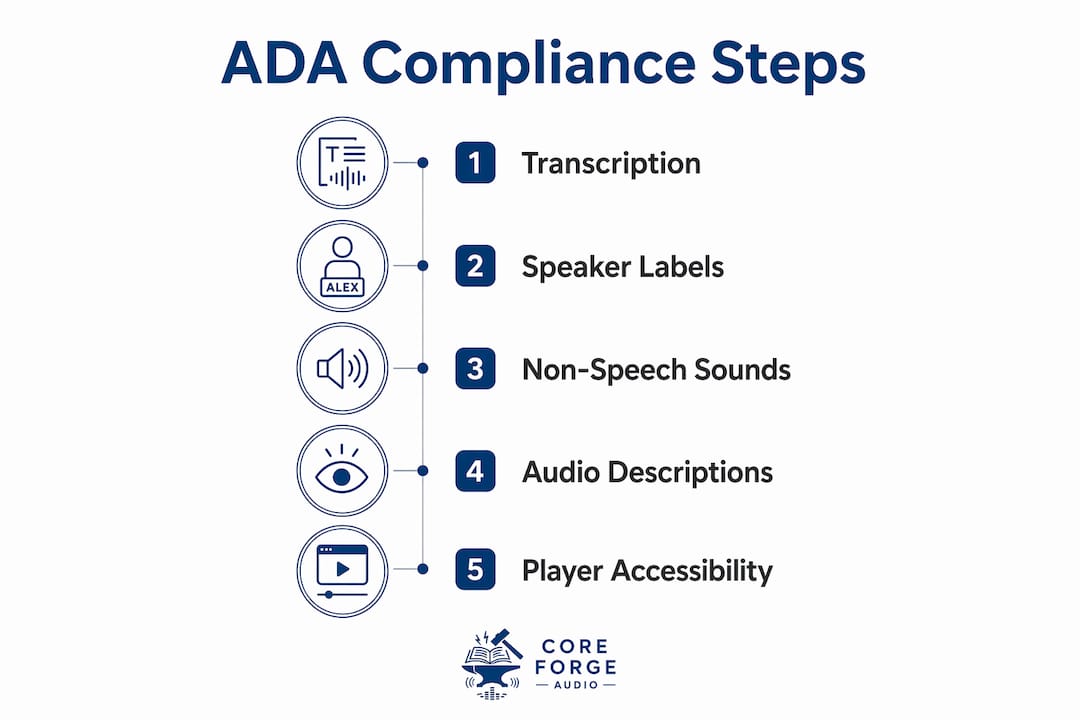
Audio descriptions are a separate narration track added during natural pauses in the primary audio. They describe what a sighted viewer would see: scene changes, on-screen text, physical actions, and visual data. For educators creating course videos or training modules, this requirement applies to any prerecorded synchronized media published after the applicable compliance deadline.
The following situations trigger the audio description requirement:
- A speaker references a chart or graph without reading its data aloud
- On-screen text appears that is not spoken by the presenter
- Physical demonstrations occur without verbal explanation
- Scene changes or location shifts carry meaning not conveyed through dialogue
Audio descriptions work alongside captions, not instead of them. Captions serve users who are deaf or hard of hearing. Audio descriptions serve users who are blind or have low vision. Both are required for fully accessible synchronized media under WCAG 2.1 Level AA. For a practical checklist on building these elements correctly, the audio description checklist from Coreforgeaudio covers the key production steps.
What are the legal deadlines for ADA audio content compliance?
The DOJ finalized its Title II rules in 2024, and the compliance clock is running. The deadlines are specific:
- State and local government entities with populations of 50,000 or more must meet WCAG 2.1 Level AA requirements by april 26, 2027.
- Smaller public entities with populations under 50,000 have until april 26, 2028.
- Title III entities (private businesses open to the public) face ongoing enforcement through DOJ complaints and federal litigation, with no single fixed deadline but active legal exposure now.
Public colleges and universities fall under Title II. That means every podcast, recorded lecture, and audio-only training file published on a university platform must meet the transcript and audio description standards by the applicable deadline. ADA Title II compliance for higher education institutions includes multimedia accessibility as a core requirement, not an afterthought.
The effective communication principle extends legal responsibility beyond your own content. Public entities are legally accountable for third-party vendor content embedded in their platforms. If you embed a vendor's audio guide or use a third-party media player that blocks screen readers, your institution carries the compliance risk. Federal settlements have already established this precedent in the museum sector, and the same logic applies to educational institutions.
Noncompliance carries real consequences. These include formal DOJ complaints, loss of federal funding for public institutions, and private litigation. Proactive compliance is significantly less expensive than reactive remediation after a complaint is filed.
What are the best practices for making audio content ADA compliant?
Making audio content accessible requires more than generating a transcript. The most common compliance failures come from process gaps, not bad intentions.
Avoid relying solely on automated transcription. AI transcription tools speed up production, but human quality assurance is required for legal accuracy. Automated tools routinely miss proper nouns, technical terminology, and overlapping speech. A transcript with 85% accuracy is not a compliant transcript. The ADA standard is effective communication, which means the transcript must be fully usable, not mostly usable.
Label every speaker clearly. Anonymous transcripts with lines like "Speaker 1" and "Speaker 2" fail the identification standard. Use full names or clearly defined roles such as "Moderator" or "Dr. Chen." This is especially critical in panel discussions, interviews, and recorded classroom sessions.
Audit your embedded audio players. Many media players are not keyboard-navigable and do not work with screen readers like JAWS or NVDA. Public entities are responsible for the accessibility of every player on their platform, including those provided by third parties. Test players with a screen reader before publishing.
Do not confuse caption files with transcripts. Adding a WebVTT caption file to an audio-only file does not satisfy the transcript requirement. Caption files are time-coded and designed for synchronized media. Audio-only content requires a standalone, time-independent text document. This is one of the most common misconceptions in compliance workflows.
Pro Tip: Run a quarterly audit of all audio content published in the past 12 months. Prioritize any files embedded in course management systems like Canvas or Blackboard, since those are the most likely targets in a DOJ review.
The long-form audio accessibility guide from Coreforgeaudio explains why audio format choices themselves affect how easily content can be made accessible, which is worth reviewing before your next production cycle.
Key takeaways
Audio content achieves ADA compliance through verbatim transcripts, speaker labels, non-speech sound notation, and audio descriptions for synchronized media with critical visual information.
| Point | Details |
|---|---|
| Transcripts are mandatory | Audio-only content requires a full, time-independent text transcript, not a caption file. |
| Speaker labels are required | Every voice in a recording must be identified by name or defined role in the transcript. |
| Audio descriptions cover visuals | Synchronized media needs audio descriptions when visual content is not explained in the audio track. |
| Compliance deadlines are firm | Large public entities must comply with WCAG 2.1 Level AA by april 26, 2027; smaller ones by april 26, 2028. |
| Third-party content is your responsibility | Public entities are legally accountable for the accessibility of embedded third-party audio players and content. |
Why I think most organizations are solving this problem backwards
Most compliance efforts I have seen start with the wrong question. Teams ask, "What is the minimum we need to do to avoid a complaint?" That framing produces the bare minimum, and the bare minimum is exactly what gets flagged in a DOJ review.
The organizations that get this right ask a different question: "Can a person who is deaf, hard of hearing, blind, or has low vision get the same information from this content as anyone else?" That question forces you to think about quality, not just presence. A transcript that exists but is unreadable is worse than no transcript, because it creates a false sense of compliance.
The technology side of this has genuinely improved. AI transcription tools from companies like Otter.ai and Rev have made first-draft transcription fast and affordable. But the human review step is where most organizations cut corners, and that is exactly where compliance breaks down. I have reviewed transcripts generated by well-regarded AI tools that missed entire sentences during moments of background noise. Those gaps are not minor. They are the difference between a compliant document and a legal liability.
The future of audio accessibility is not just about meeting the 2027 deadline. Platforms that build accessibility into their production workflow from the start, rather than retrofitting it at the end, will spend less time and money on compliance over the long term. Coreforgeaudio is building toward that model, with accessibility features integrated at the platform level rather than bolted on afterward.
My honest advice: treat the 2027 deadline as a forcing function to fix your entire audio production process, not just a date to hit. The organizations that do this will be better positioned for whatever the DOJ requires next.
— Sarmed
How Coreforgeaudio supports accessible audio content
Coreforgeaudio is built around the principle that accessible audio is not a compliance checkbox. It is the foundation of equitable content. The platform integrates accessibility features directly into its audiobook delivery system, including adjustable narration speeds, dyslexia-friendly fonts, and multilingual support. For educators and professionals working to meet ADA audio content standards, Coreforgeaudio offers a model for what accessibility-first audio production looks like in practice. Explore how Coreforgeaudio approaches accessible audio creation and how its tools can support your compliance workflow without sacrificing content quality.
FAQ
Does audio-only content require captions or transcripts?
Audio-only content requires a full text transcript, not captions. Captions are for synchronized media; transcripts are the correct format for standalone audio files.
What must a transcript include to meet ADA standards?
A compliant transcript must include every spoken word verbatim, speaker identification, and all meaningful non-speech sounds such as applause or laughter. Omitting any of these elements fails the effective communication standard.
When are audio descriptions required under ADA?
Audio descriptions are required for prerecorded synchronized media when critical visual information is not conveyed through the audio track. This includes on-screen text, charts, and physical demonstrations not described aloud.
What is the ADA compliance deadline for public universities?
Public universities and state entities with populations over 50,000 must meet WCAG 2.1 Level AA standards by april 26, 2027. Smaller entities have until april 26, 2028.
Can automated transcription tools satisfy ADA requirements?
Automated tools can generate a first draft, but human quality review is required for legal compliance. AI transcription alone does not meet the accuracy standard the ADA demands for effective communication.